You can deposit to GSpot88 with GCash or Maya from the Deposit page in your account, from ₱100 to ₱50,000 per transaction. Your deposit is credited once your payment goes through, usually within 30 minutes, and in our own tests the balance showed up right away. This guide covers both methods, each step of the Deposit page, the bonus question on the form, and what to do if a deposit does not go through.
Deposit Methods at a Glance
GSpot88 accepts two deposit methods, each with a few payment channels to choose from:
| Method | Channels on the Deposit page | Per transaction | Full guide |
|---|---|---|---|
| GCash | CLP – Direct, HSPay, HSPay – QR | ₱100 to ₱50,000 | GCash deposit guide |
| Maya | RMPAY, ClickPay | ₱100 to ₱50,000 | Maya deposit guide |
The channels under each method work the same way, so if one does not go through, you can choose another and try again. Bank transfer is available for withdrawals only, not deposits.
In our testing, GCash was the easier of the two. You pay by scanning a QR code, while Maya asks you to log in to your Maya account on Maya’s own web page.
Decide on a budget before you deposit, and keep each deposit to money you can comfortably spend on entertainment.
How to Make a Deposit
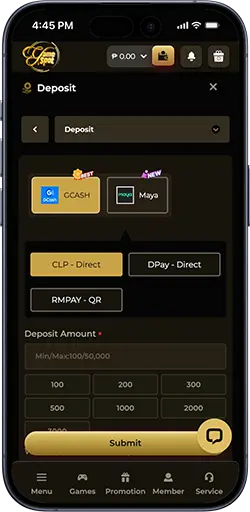
Every deposit starts from the Deposit page in your GSpot88 account:
- Tap Deposit on the VIP card on the homepage, or go to Member > Deposit.
- Choose GCash or Maya, then choose a channel.
- Enter your Deposit Amount, or tap a quick amount: ₱100, ₱200, ₱300, ₱500, ₱1,000, ₱2,000, or ₱3,000.
- Answer “Would you like to claim your bonus?” by selecting a bonus or Disclaim, as explained in the next section.
- Tap Submit.
A payment page then opens in a new browser tab, where you complete the payment:
- GCash: A “Payment Cashier” page shows a QR code and an OPEN in GCash button. Tap OPEN in GCash, or scan the QR code with the QR scanner in GCash. If you are depositing from the same phone you pay with, take a screenshot of the QR code and upload it through the QR feature in GCash, as the page instructs.
- Maya: Maya’s own “Login Maya to confirm payment” page opens. Enter your Maya mobile number and password, then log in to pay.
From there, follow the e-wallet’s on-screen instructions to finish paying. Each method’s guide walks through these screens step by step.
Choosing a Bonus on the Deposit Form
The Deposit page asks “Would you like to claim your bonus?” before you can submit. Only the bonuses available to you appear in the list. Select one, or select Disclaim to deposit without a bonus.
On your first deposit, you can select the 100% FIRST DEPOSIT BONUS. It adds a bonus of 100% of your deposit, from a ₱100 minimum deposit up to a maximum bonus of ₱2,000, with a wagering requirement of 25x the bonus amount that counts on slot games only. You must select it before you submit your first deposit, since a first deposit made without it may not qualify. Before claiming, make sure the wagering requirement fits your budget. You never need to chase a bonus. The full terms are in our welcome bonus guide, and our other offers are on the promotions page.
When Your Deposit Shows Up
Your deposit is credited to your account once your payment goes through, usually within 30 minutes. In our own tests, it arrived right away. You can track every deposit, and its status, in the Deposit History tab of the Deposit page.
If Your Deposit Does Not Go Through
A deposit that fails is the deposit issue players ask our support team about most. If yours does not go through, try these in order:
- Go back to the Deposit page, choose a different channel under the same method, and try again.
- Check that your amount is between ₱100 and ₱50,000.
- If you already paid but your balance has not updated after 30 minutes, contact our support team with your e-wallet reference number.
While you wait for a deposit you already paid for, do not pay a second time for the same deposit.
Depositing Safely
A few habits keep your money safe:
- Start every deposit from the Deposit page in your GSpot88 account, never from a link someone sends you.
- Never send money to anyone who offers to deposit for you, including people who claim to work for GSpot88.
- Never share the one-time codes or PIN for your GCash or Maya account with anyone.
Our security page explains how your account and payments are protected.
Questions About Depositing
Does GSpot88 charge a deposit fee?
No. GSpot88 does not charge any fee for deposits.
Does the GCash or Maya account have to be in my name?
No, you can deposit from a GCash or Maya account in another person’s name. Withdrawals are different, since they only go to accounts in your own name.
Can I cancel a deposit?
Yes, as long as you have not completed the payment yet. Nothing leaves your e-wallet until you pay on the GCash or Maya page.