

To deposit with Maya, you start from the Deposit page in your GSpot88 account, then confirm the payment on Maya’s own page, either by logging in to Maya or by scanning a QR code. When we tested it, the whole payment took about two minutes. Maya deposits run from ₱100 to ₱50,000 per transaction. If you still know Maya by its old name, PayMaya, these are the same e-wallet and the same steps. For an overview of all methods, see our deposit guide.
Maya Deposit Limits and Channels
Here is what applies to every Maya deposit:
| Detail | Maya |
|---|---|
| Minimum per transaction | ₱100 |
| Maximum per transaction | ₱50,000 |
| Channels on the Deposit page | RMPAY, ClickPay |
| Fee charged by GSpot88 | None |
Both channels work the same way, so you can pick either one. Set your budget before you open the Deposit page, and keep each deposit within it.
How to Deposit With Maya
- Tap Deposit on the VIP card on the homepage, or go to Member > Deposit.
- Select Maya, then choose RMPAY or ClickPay.
- Enter your Deposit Amount, or tap a quick amount from ₱100 to ₱3,000.
- Under “Would you like to claim your bonus?”, select a bonus or Disclaim.
- Tap Submit.
At step 4, new members can select the 100% FIRST DEPOSIT BONUS on their first deposit. It adds a bonus of 100% of your deposit, from a ₱100 minimum deposit up to a maximum bonus of ₱2,000, with a wagering requirement of 25x the bonus amount that counts on slot games only. Before claiming, make sure the wagering requirement fits your budget. You never need to chase a bonus. The full terms are in our welcome bonus guide.
Confirming the Payment on Maya’s Page
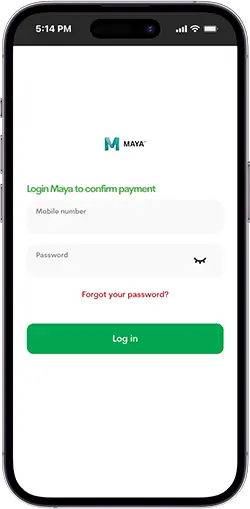
After you tap Submit, Maya’s own “Login Maya to confirm payment” page opens in a new browser tab. If the Maya app is installed on your phone, the app opens instead. The page expires after 10 minutes of inactivity, so have your Maya login details ready before you tap Submit.
You can confirm the payment in either of two ways.
Logging In to Maya
- Enter the mobile number and password of your Maya account, then tap Log in.
- Enter the one-time code that Maya sends to your phone by SMS.
- Check the amount, then confirm the payment by following Maya’s on-screen steps.
The “Forgot your password?” link on this page belongs to Maya, not GSpot88, so use it only for your Maya password.
Scanning the QR Code
Maya’s page also offers a QR code. Scan it with the Maya app to pay, then confirm the payment in the app.
Whichever way you pay, your Maya receipt will show the name GSpot88, so you can tell it is the right payment. Only enter your Maya password on the page that opens after you tap Submit, never on a page someone sends you a link to.
Checking That Your Deposit Arrived
Your deposit is credited once the Maya payment goes through, usually within 30 minutes. In our own tests, it arrived right away. You can check its status at any time in the Deposit History tab of the Deposit page.
If Your Maya Deposit Fails
Maya deposits fail for the same reasons as GCash deposits, most often a QR code that cannot be read properly. Find your situation below:
- The QR code will not scan: Go back to the Deposit page and submit your deposit again to get a new QR code, or log in to Maya instead.
- The page expired: Maya’s page expires after 10 minutes of inactivity. Submit a new deposit and start again.
- You cannot log in to Maya: Check your Maya mobile number and password. If you have forgotten your Maya password, reset it through Maya, then submit a new deposit.
- The channel is not working: Switch between RMPAY and ClickPay and try again.
- You paid, but the deposit is not credited after 30 minutes: Contact our support team with the reference number from your Maya receipt. Do not pay again for the same deposit while you wait.
If Maya still does not go through, you can also deposit with GCash, as our GCash deposit guide explains.
Questions About Maya Deposits
Can I deposit from a Maya account that is not in my name?
Yes. GSpot88 accepts deposits from a Maya account in another person’s name. Withdrawals work differently, since they only go to an account in your own name.
Can I cancel a Maya deposit after tapping Submit?
Yes, as long as you have not confirmed the payment in Maya yet. Nothing is deducted from your Maya balance until you do.